Changelog

Follow new updates and improvements to Growably.

Social Planner: Community Posting via Public API

Community posting just became more powerful for developers and integration partners.

You can now schedule and publish Community posts through the Social Planner Public API, including choosing which Community member the post should be published as.

This makes it easier for marketplace apps and custom integrations to bring Community publishing into their own workflows.

What's new

List Community Members

Integration partners can now retrieve eligible Community members who can publish posts.

  • Search members by name

  • Paginate through member lists

  • Only active, permitted members are returned

  • Private Communities return only members of that specific group

Validate Member Eligibility

Before scheduling a post, integrations can verify whether a selected member is still active and authorized to publish in the Community.

Publish as a Specific Member

When creating a Community post through the API, integrations can specify which eligible member the post should be published as.

Publish-Time Verification

Social Planner performs a final eligibility check before publishing. If the selected member has left the Community or lost permission, the post won't be published under the wrong identity.

Instead, the post fails with a clear and actionable error.

How it works

  • Connect a Community group in Marketing → Social Planner → Settings → Social Accounts

  • Use Get Accounts to retrieve the Community account ID

  • Use Get Community Members to retrieve eligible members

  • Select the member you want to publish as

  • Create the post using the Community post API

  • Optionally validate the member before scheduling

  • Social Planner verifies the member again before publishing

Why it matters

  • Enable Community publishing through marketplace apps and custom integrations

  • Automate Community announcements from external workflows

  • Ensure posts are always published by an eligible member

  • Catch invalid member selections before publishing

  • Get clear error messages instead of silent publishing failures

  • Bring Community posting closer to API parity with other social channels

Notes

  • Community account connection and management remain available in the HighLevel UI.

  • The Public API supports member listing, member validation, scheduling, and publishing.

  • Draft posts don't require a postAsUser selection.

  • Member eligibility is checked when posts are scheduled or published.

  • The selected member must remain active and permitted in the Community at publish time.

  • API access requires the appropriate Social Planner scopes.
NewSocial Media

Meta Post-Publish Recommendations in Ad Manager

Ad Manager now brings Meta’s post-publish recommendations directly into published campaigns, helping users identify and act on optimization opportunities without switching to Meta Ads Manager.

👀 What’s New?

Once a Meta campaign is published, users can now:

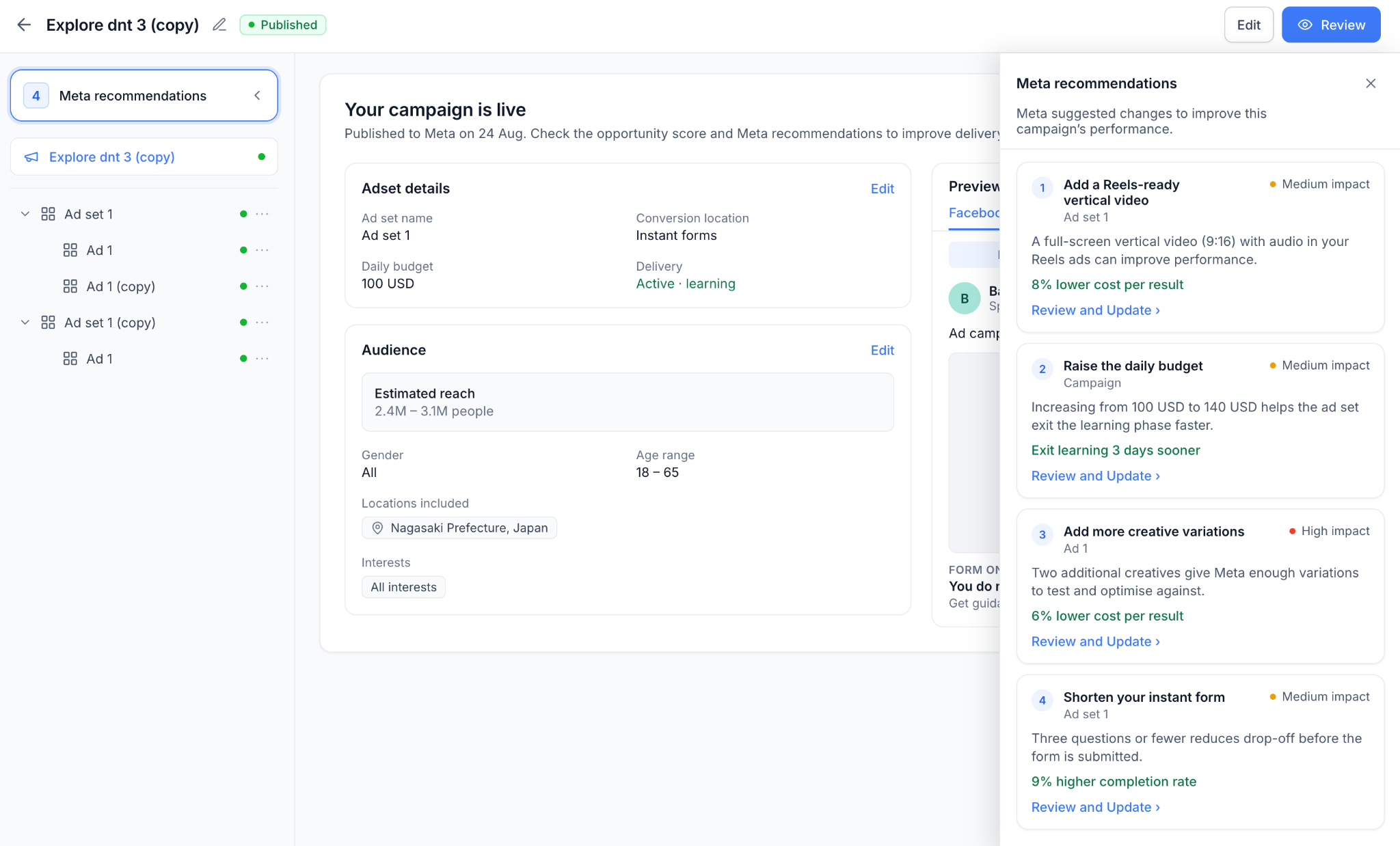
  • View Meta-generated recommendations directly from the campaign Review screen.

  • See the number of available recommendations at a glance.

image
  • Understand the suggested change, affected campaign element, and expected performance improvement, when provided by Meta.

  • See the recommendation's impact level - High, Medium, or Low.

  • Click Review and Update to navigate directly to the relevant section of the campaign and make the suggested change.

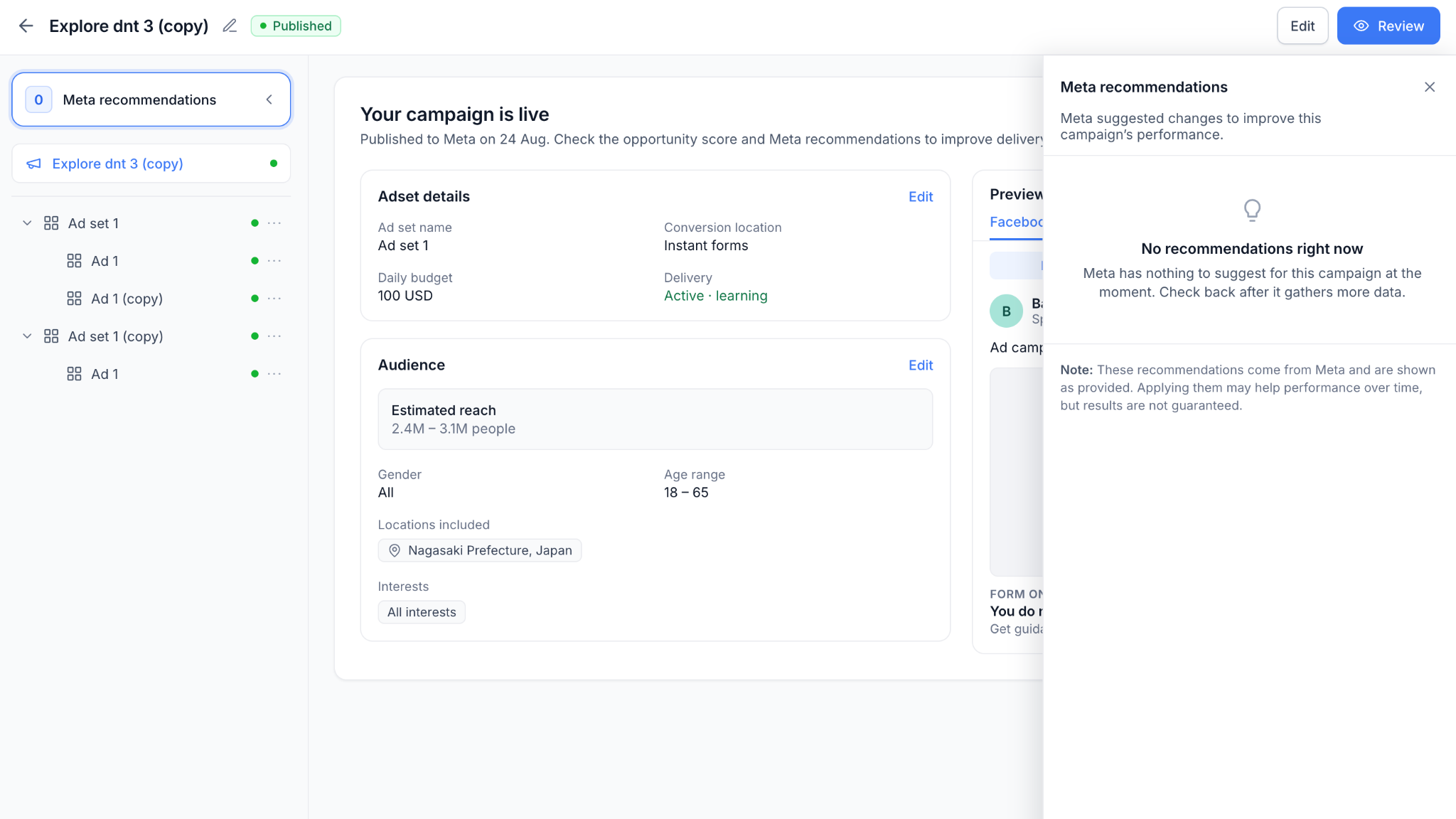
  • See a clear “No recommendations right now” state when Meta has no suggestions for the campaign.

image

👷 How to Use?

  1. Open a published Meta campaign in Ad Manager.

  2. Go to the Review screen.

  3. Select Meta recommendations from top left button to view available suggestions.

  4. Click Review and Update on a recommendation.

  5. Make the suggested change within the relevant campaign section.

⭐ Why This Feature?

  • Campaign optimization continues after publishing. By bringing Meta’s recommendations directly into Ad Manager, users can quickly identify potential improvements and take action without moving between Ad Manager and Meta Ads Manager.

🚀 What’s Next?

  • We plan to further unify pre- and post-publish optimization by showing Opportunity Score alongside Meta recommendations for published campaigns, creating a continuous optimization experience throughout the campaign lifecycle.

📝 Notes

  1. Recommendations and expected outcomes are provided by Meta and may change as campaign performance data evolves. Applying a recommendation does not guarantee improved results.

  2. Only recommendations that can be addressed directly within Ad Manager are surfaced.

NewSocial Media

Instagram Explore feed placement discontinued by Meta

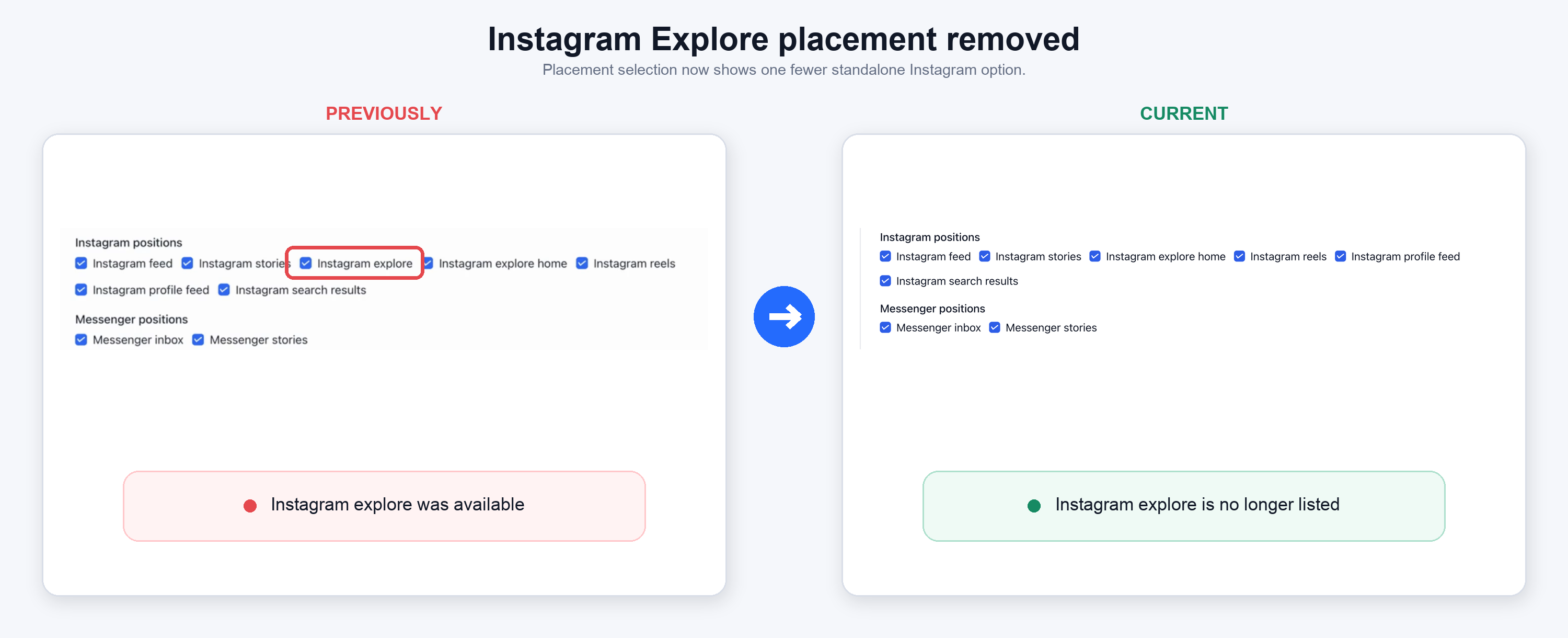
Meta has discontinued the Instagram Explore Feed placement as part of their Marketing API v26 update.

This upgrade means 'Instagram Explore' is no longer available as an ad placement in the campaign creation workflow. But, your existing campaigns stay running, and the transition happens automatically in the background with no errors or action required.

👀 What changes?

  • Instagram Explore Feed is no longer available as a selectable ad placement, per Meta's v26 API changes.

  • The upgrade ensures continuity, keeping the ad manager product compliant with Meta's v26 Marketing API requirements.

instagram-explore-placement-original-screenshots-markup

👷 How it works?

  • No action needed- the ad placement deprecation happens automatically and silently with no errors surfaced.

  • Published Meta campaigns with Explore enabled remain live and unaffected.

  • Draft campaigns have Explore removed automatically as soon as the ad set is saved.

  • Delivery shifts to other eligible placements.

⭐ Why It Matters

  • Ensures continuity - live campaigns are not disrupted or unpublished by this change.

  • No errors or failures surface

    to users during the transition.

  • Compliance with Meta's v26 Marketing API requirements.

📝 Notes

  • This is a Meta-driven platform deprecation, not a Growably product decision.

  • Existing Template Library and campaign workflows remain otherwise unchanged.

Earlier updates