August 6th, 2025
Improved
Courses & Communities
Automate Badge Issuance in Workflows (Using “Issue Certificate” Action)
⭐️ Overview
Badges are a lightweight, visual way to recognise milestones, progress, and engagement. While we’re actively working on a dedicated “Issue Badge” action, you can start issuing badges right now using the existing “Issue Certificate” workflow action.
Yes — Badges are issued through the same action as Certificates!
⚙️ How It Works
You can combine any of the supported workflow triggers with the existing “Issue Certificate” action to send a Badge automatically to your customers.
✅ Just select a Badge template instead of a Certificate template when using the "Issue Certificate" action.
🧐
Most Used Triggers + Use Cases
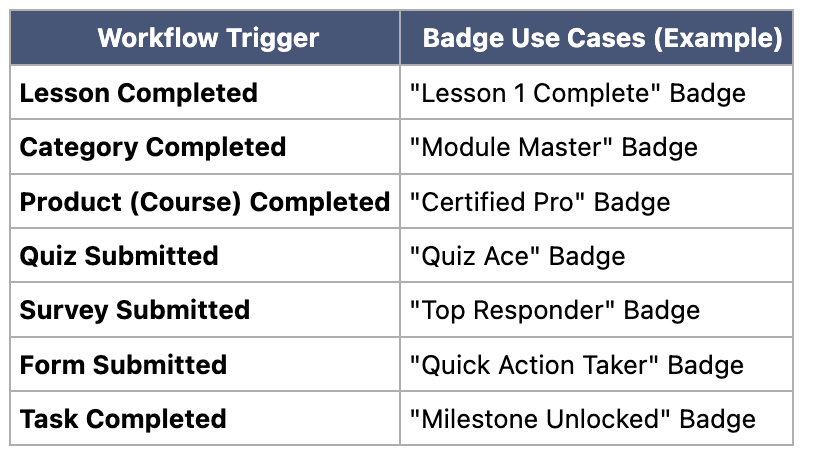
You can find these triggers inside your Workflow Trigger menu, under “Courses,” “Contact,” and “Form Activities.”
👋How to Set It Up?
Go to Automation > Workflows
Create from Scratch or open an existing Workflow
Add a Trigger from the list above
Add an Action → select Issue Certificate
Choose a Badge template instead of a Certificate template
Save & Publish ✅
Note: Badges are fully visual and lightweight — perfect for micro-recognition. They’ll be sent as downloadable images to your customers.
⏳ Coming Soon
We’re introducing a dedicated “Issue Badge” action to make this even clearer and easier to use.
Until then, the “Issue Certificate” action supports both Badges and Certificates seamlessly.