June 30th, 2025
New
Sales Pipelines
Opportunities & Pipelines – Restore Deleted Pipelines via Audit Logs
📌 Overview
Admins can now restore deleted pipelines — including all their associated stages and opportunities — directly from the Audit Logs page. This provides greater control, traceability, and recovery flexibility when working with pipeline data.
🚀 What’s New
Restore Pipelines via Audit Logs
A new “Restore” action is available in Audit Logs for any pipeline that has been deleted. This allows users to quickly recover pipelines along with their structure and associated data.
Pipeline Filter in Module Dropdown
The Module filter in Audit Logs now includes “Pipeline” for easy access and faster filtering of relevant actions.
⚙️ How It Works
Navigate to Settings > Audit Logs
From the Module dropdown, select Pipeline
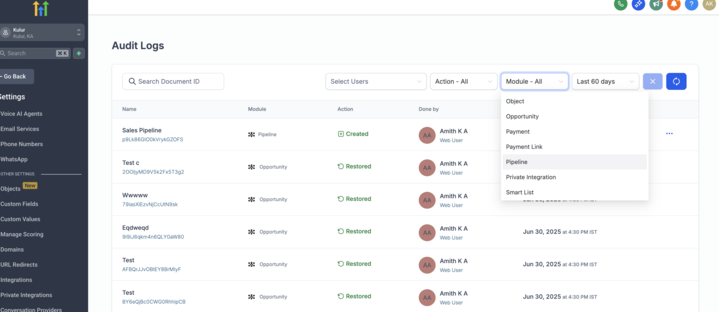
Locate a deleted pipeline entry
Click the ellipsis (⋯) menu next to the deleted pipeline
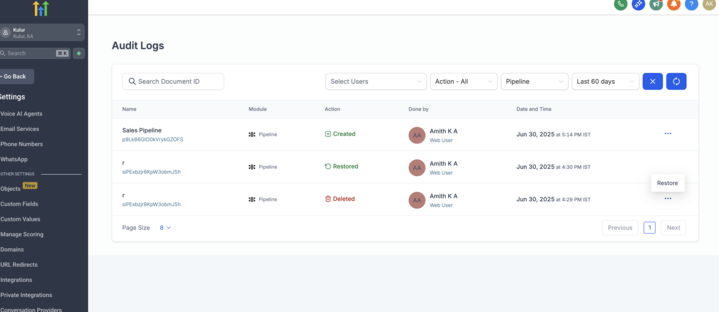
Select Restore and confirm in the modal
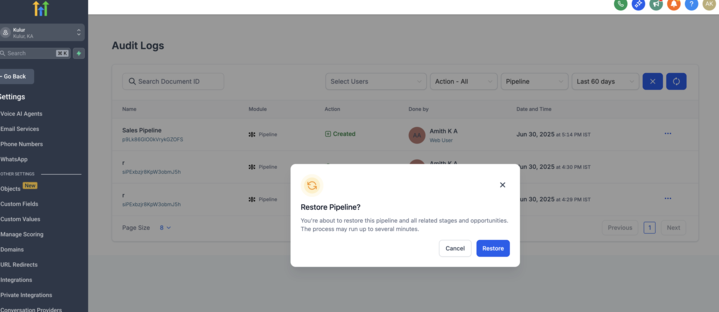
The pipeline will be restored along with its stages and opportunities.
🎯 Why It Matters
Prevents loss of critical pipeline configurations due to accidental deletion
Helps admins maintain oversight over historical actions and quickly recover from mistakes
Improves auditability and trust when managing pipeline lifecycle operations