New Integrate Experience in Forms, Surveys & Quizzes
Integrating and sharing your Forms, Surveys & Quizzes just got a whole lot easier! 🎉
We're excited to introduce a completely revamped Integrate experience, bringing all your embedding, sharing, email, and connection options into one dedicated tab within the Form, Survey & Quiz Builder.
From live embed previews and ready-to-use QR codes to Workflow connections and smarter post-save actions, we're making it easier than ever to get your Forms, Surveys & Quizzes out into the world! ✨
🆕
What's New?
🧩 1. A Dedicated Integrate Tab — Everything in One Place!
Previously, users accessed their integration options through the Integrate CTA in the builder.
We've now moved this experience into a dedicated Integrate tab, making it easier to discover, access, and manage all the ways your Forms, Surveys & Quizzes connect with the rest of the platform.
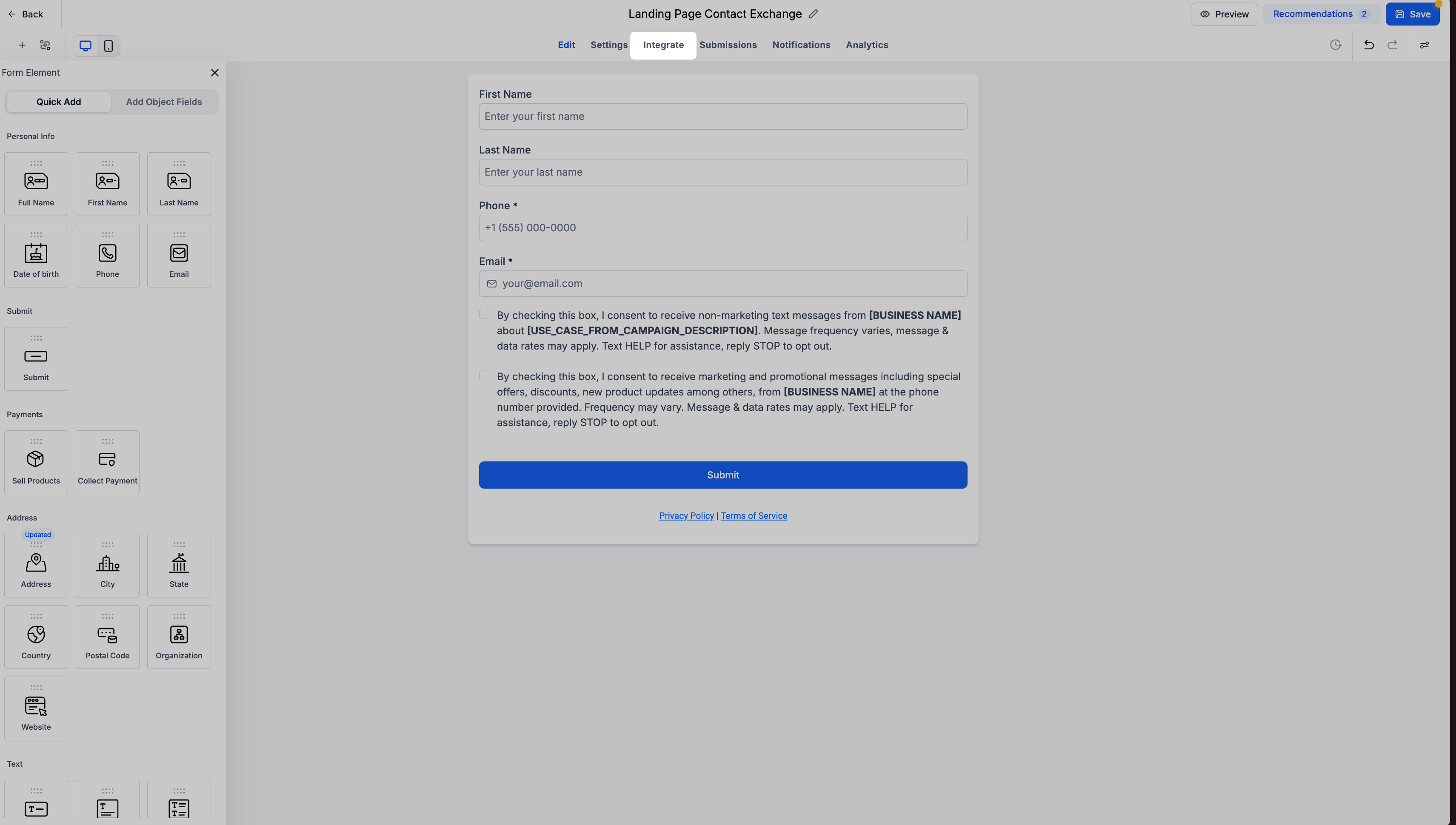
The new Integrate tab brings together four key sections:
🌐Embed: Embed your Forms with live previews and customizable options.
🔗Share: Share your Forms through links, social platforms, and QR codes.
📧Email: Add your Forms to email templates.
🔄Connection: Discover connected Workflows and create new ones.
👀2. Embed — Live Previews Are Here!
Ever wondered exactly how your Form would look when embedded on a website? Now you don't have to guess!
We've introduced Live Previews across all existing embed options, allowing users to visualize their Forms, Surveys & Quizzes before embedding them.
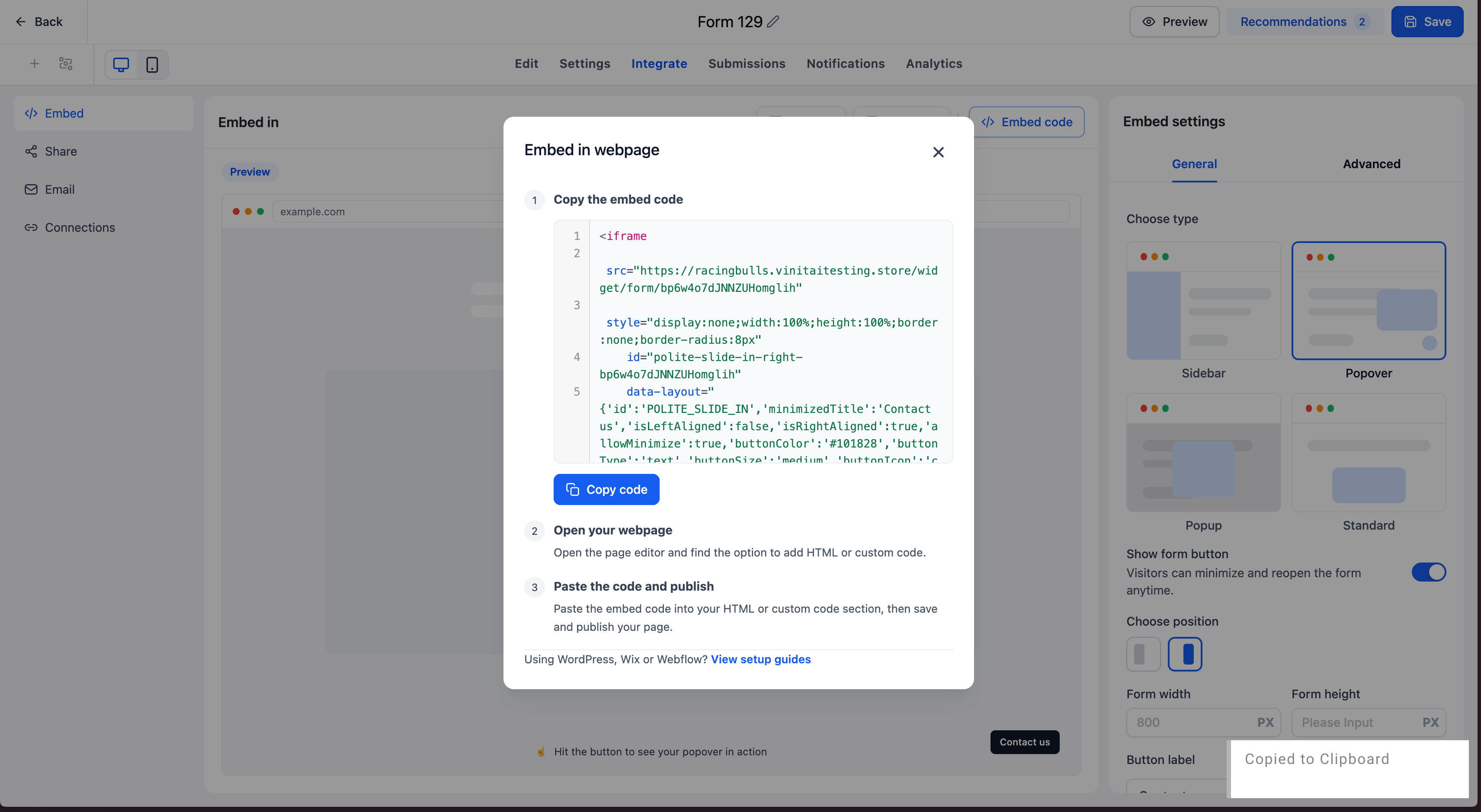
Here's what's new:
💻Live Embed Previews: Instantly see how your Form, Survey, or Quiz will appear across different embed options.
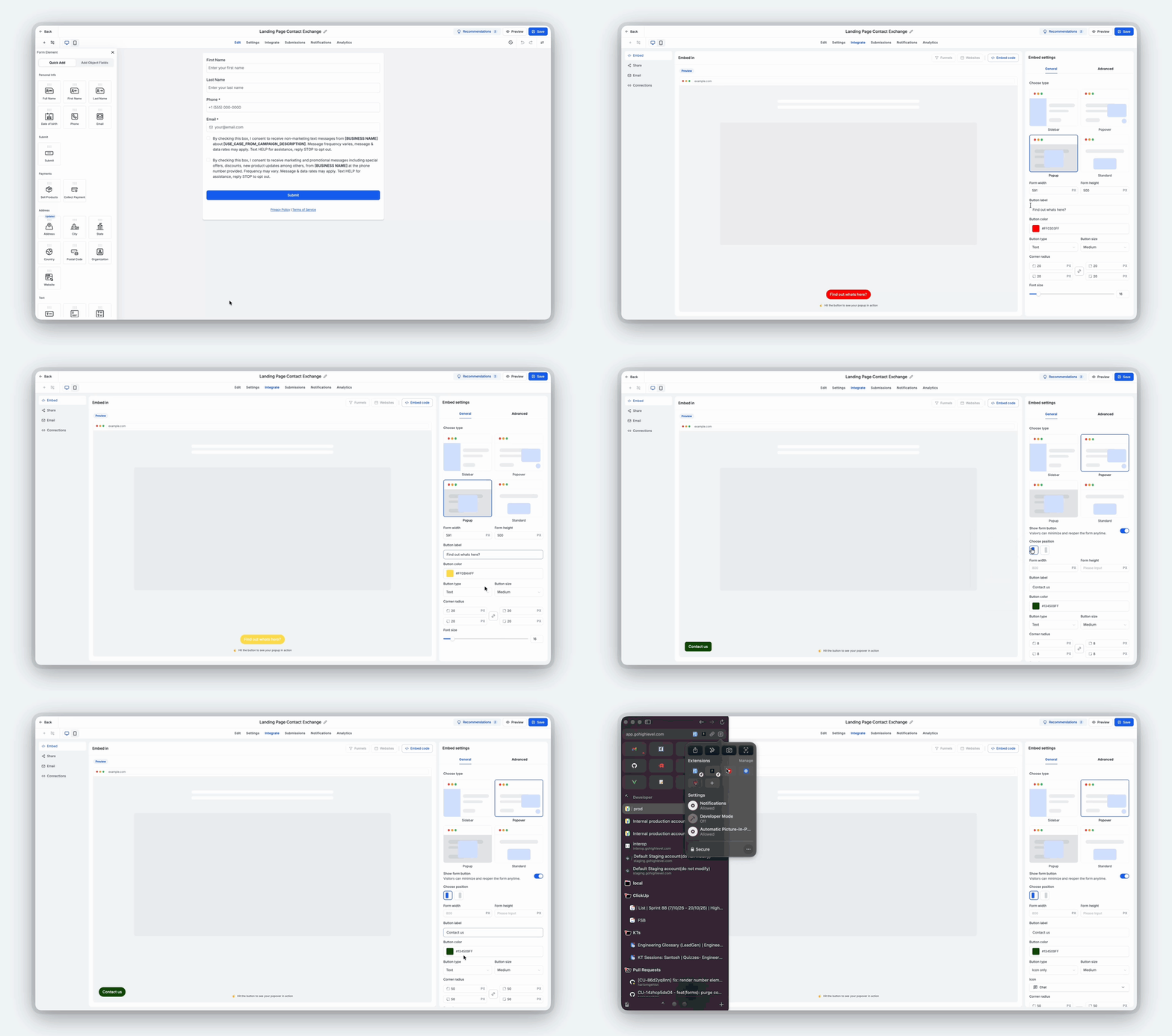
🎨Preview Your Changes: Make adjustments to your embed configuration and see those changes reflected in real time.
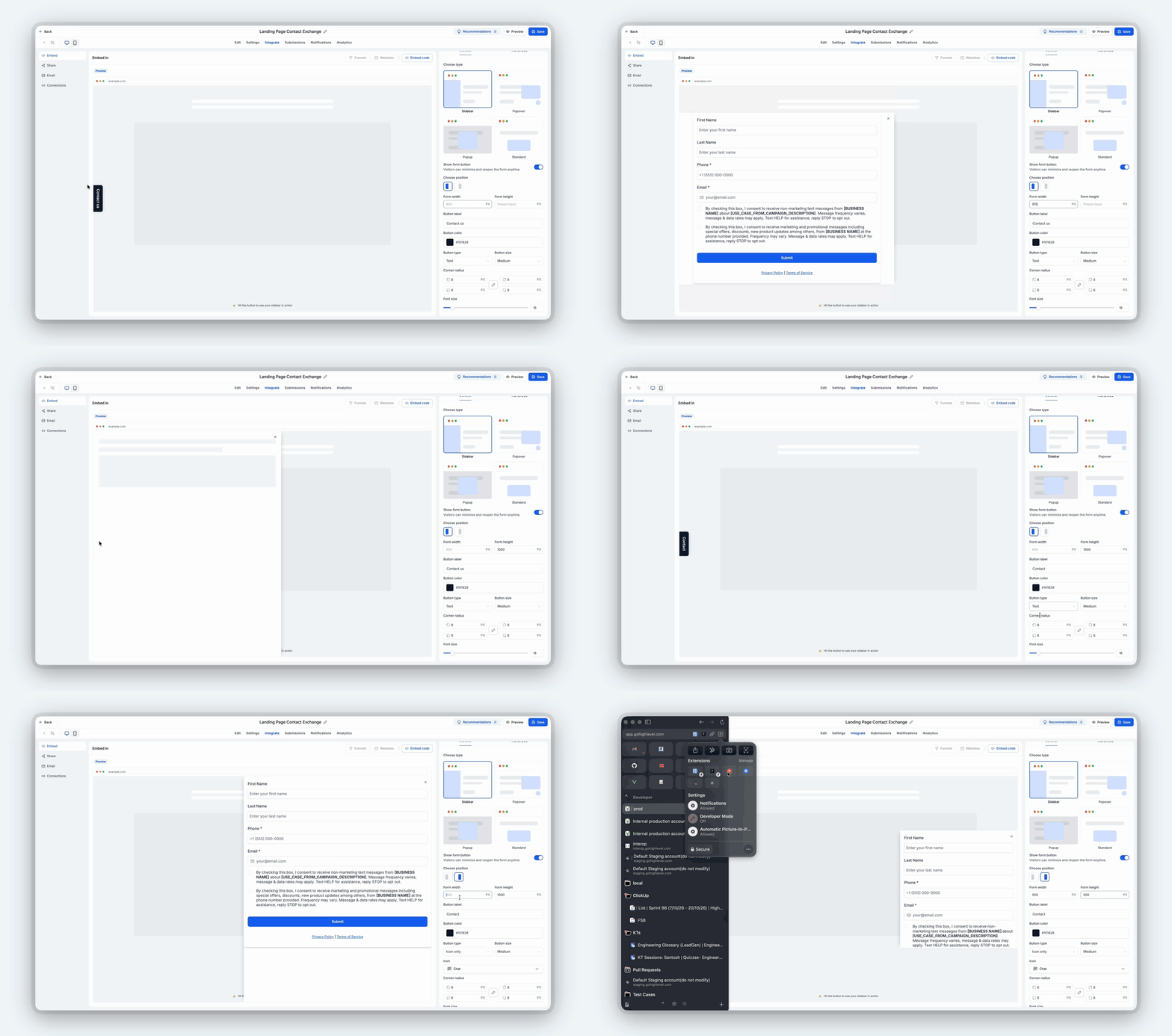
🎯Choose with Confidence: Compare different embed experiences and select the one that works best for your use case.
No more trial and error or repeatedly switching between your builder and website to check how things look!
🔜 Coming Soon: Direct Funnel & Website Embedding
We're also bringing a much-requested capability to the Embed tab! Users will be able to embed their Forms, Surveys & Quizzes directly into Funnel steps and Website pages from within the Form Builder.
This means you'll be able to select your preferred Funnel step or Website page and embed your Form directly, without navigating between different builders.
A major workflow improvement for users building Funnels & Websites! 🚀
🔗 3. Share — More Ways to Share, Including Ready-to-Use QR Codes!
We've brought all your sharing options together in one convenient place, making it easier to distribute your Forms, Surveys & Quizzes wherever your audience is.
Here's what you can do:
🔗Direct Links: Quickly access and copy your Form, Survey, or Quiz link.
📱Social Sharing: Share your Form across different social media platforms.
📲Prebuilt QR Codes: Every Form, Survey, and Quiz now comes with a ready-to-use QR code automatically mapped to it!
🎨Customize Your QR Code: Edit the design of your QR code directly from the builder.
🔽Download & Share: Download your QR code and use it wherever you need.
The best part? 🙌
Previously, users had to navigate to the QR Code section and manually create a separate QR code for their Form, Survey, or Quiz. Now, your QR code is already waiting for you! Simply customize it, download it, and start sharing — all without leaving the builder.
📧 4. Email — Add Your Forms to Emails
The Email integration experience remains unchanged and is now accessible from the dedicated Integrate tab.
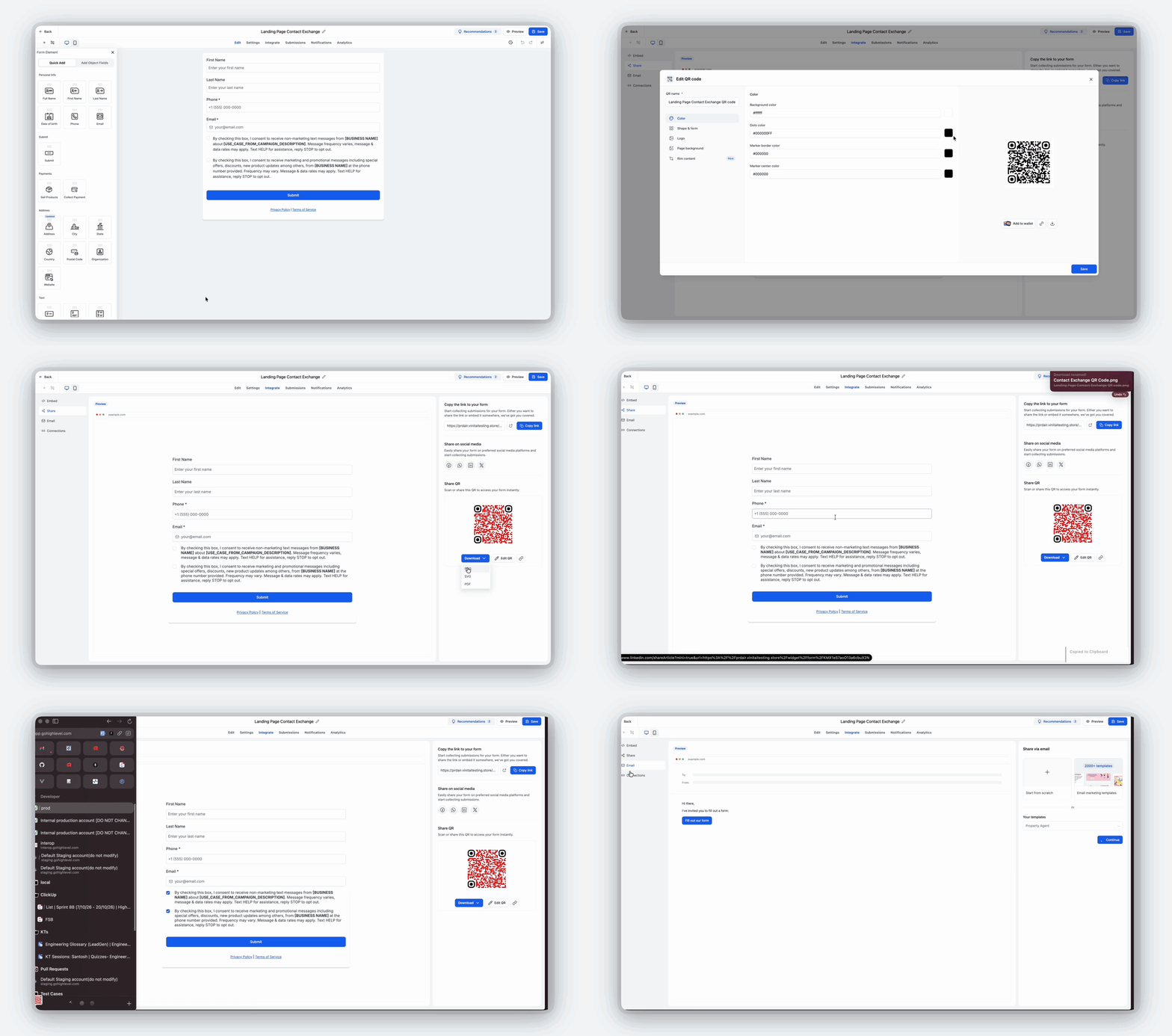
Users can continue to:
📩Use Existing Templates: Embed their Form into an email template of their choice.
✨Start from Scratch: Create a new email and embed their Form directly into it.
Everything you need to bring your Forms into your email communication workflows, now accessible alongside your other integration options.
🔄 5. Connection — Know Exactly Where Your Forms Are Connected!
One of the biggest challenges users faced was understanding where their Forms, Surveys & Quizzes were being used across the platform.
Whether it was identifying which Workflow was connected to a Form or tracking down where a Form had been embedded, users often spent considerable time searching for these connections.
We're solving this with the new Connection tab! 🎯
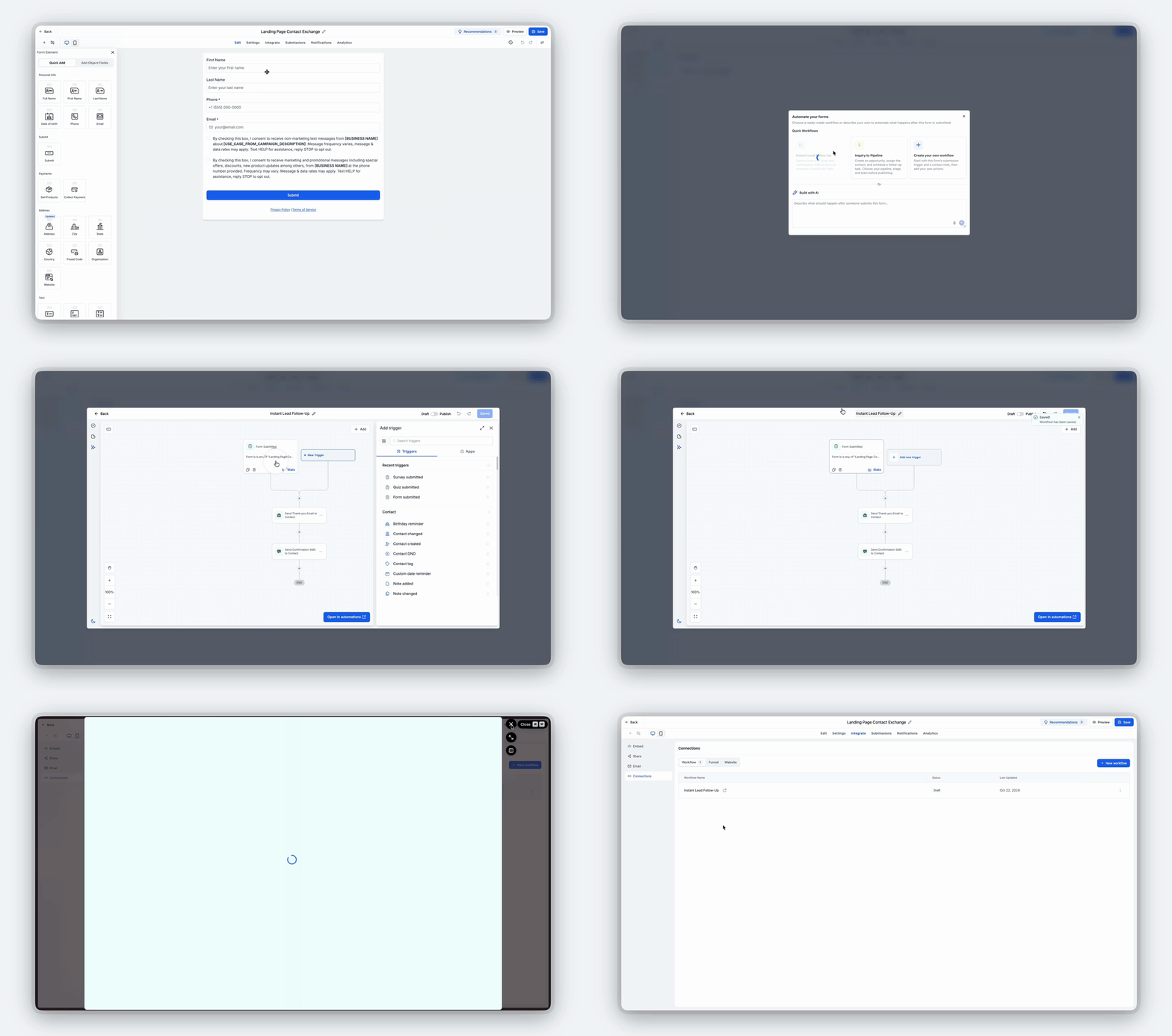
Here's what's available in the initial release:
🔍Connected Workflows: View the Workflows associated with your Form, Survey, or Quiz in one place.
⚡Create a New Workflow: Quickly initiate the creation of a new Workflow for your Form directly from the Connection tab.
🧭Better Visibility: Understand your existing Workflow connections without manually searching through the platform.
🔜 Coming Soon: Funnel & Website Connections
We're extending the Connection tab to also display:
🌐Connected Funnel Steps: See which Funnel steps have your Form embedded.
💻Connected Website Pages: Identify the Website pages where your Form is being used.
Our goal is simple: Give users complete visibility into where their Forms, Surveys & Quizzes are connected across the platform. No more wasting hours trying to track down connections!
💾 6. A Smarter Save Experience — What's Next After Saving?
We're also making the Save experience more actionable!
Previously, saving a Form, Survey, or Quiz was often the end of the building journey, leaving users to figure out their next steps on their own. Now, when users click Save, we display a modal that highlights the available integration options and encourages them to take the next step.
The modal helps users discover actions like:
🔗Share Your Form: Get your Form in front of your audience.
🌐Embed Your Form: Explore options to add your Form to a website or other destination.
⚡Create a Workflow: Set up automation for your Form submissions.
This creates a more guided experience, helping users move naturally from building their Form to actually putting it to use! 🚀
⚙️ How It Works
Open Your Builder: Navigate to any Form, Survey, or Quiz.
Explore Integrate: Access the new dedicated Integrate tab.
Choose Your Action: Select Embed, Share, Email, or Connection.
Preview & Customize: Explore live embed previews or customize your prebuilt QR code.
Manage Connections: View connected Workflows or initiate the creation of a new one.
Save & Take Action: When saving your Form, use the new modal to discover sharing, embedding, and automation options.
🌟 Key Highlights
🧩Centralized Integrations: A dedicated Integrate tab brings all integration options together.
👀Live Embed Previews: See how your Form will look across different embed options before using them.
📲Ready-to-Use QR Codes: Automatically generated QR codes that can be customized and downloaded directly from the builder.
🔗Simplified Sharing: Access Form links and social sharing options from one place.
🔄Workflow Visibility: Quickly identify which Workflows are connected to your Form.
⚡Faster Workflow Creation: Create new Workflows directly from the Connection tab.
💾Smarter Save Experience: Guide users toward sharing, embedding, or automating their Forms after saving.
🚀More Connected Workflows: Reduce unnecessary navigation and make integrations easier to discover and manage.
🔜 Upcoming Enhancements
Direct embedding of Forms, Surveys & Quizzes into Funnel steps and Website pages from the Embed tab.
Visibility into connected Funnel steps and Website pages within the Connection tab.
🎯 Why This Matters
Building a Form, Survey, or Quiz is only half the journey. The real value comes from sharing it, embedding it, connecting it to automations, and knowing exactly where it's being used. Until now, these actions were spread across different sections of the platform, creating unnecessary friction and making it difficult for users to discover and manage their integrations.
With the new Integrate experience, we're bringing these capabilities together into one intuitive workflow. Users can now preview their embeds, share their Forms with ready-made QR codes, discover connected Workflows, and take meaningful next steps immediately after saving. And with direct Funnel & Website embedding and connection visibility on the way, we're making the experience even more seamless.
Less Searching. Less Switching. More Sharing. Smarter Integrations! 🚀