June 11th, 2025
Audit Logs for Calendar & Video Conferencing Integrations
You can now track all key actions taken on calendar and video conferencing integrations directly in the Audit Logs, giving you greater transparency and control.
---
✅ What’s New
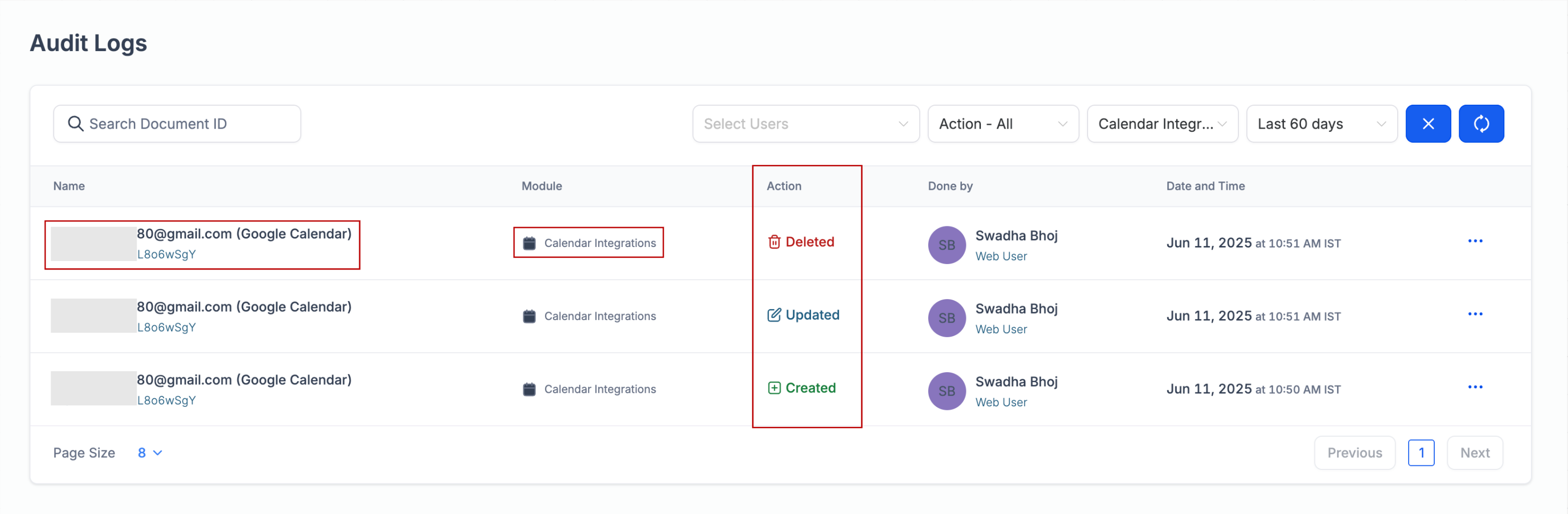
A new module called Calendar Integrations has been added to Audit Logs
You can now filter logs specifically for calendar/meeting integrations
The following actions are now tracked: Connect, Reconnect, and Delete
---
🔍 What’s Captured in the Logs
Each log entry provides a detailed snapshot of the integration activity, including:
The email address associated with the integration
The integration type (e.g., Google, Outlook, iCloud, Calendly, Zoom, Microsoft Teams)
Who initiated the action
Which user the action was performed for
What action was taken (Create / Update / Delete)
When the action occurred
---
📘 How to Use
Go to Settings > Audit Logs
Use the Calendar Integrations module filter to view relevant events
Get a full breakdown of all integration changes across your subaccount
---
🧠 Why It Matters
Gain clear visibility into changes made to calendar and video conferencing integrations
Improve accountability across your team
Quickly investigate or audit who connected, disconnected, or reconnected integrations — and for whom